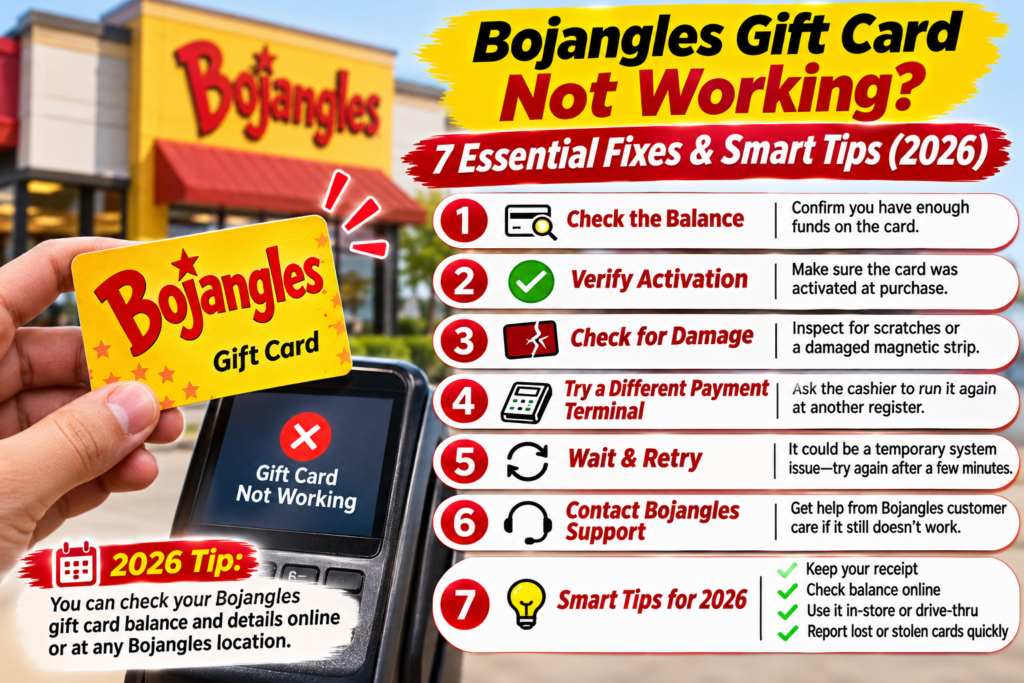
You stop at Bojangles to pick up breakfast, order your usual biscuit combo, and hand over a gift card you’ve been saving. The cashier scans or enters it, but the payment doesn’t go through. Maybe the register says the balance is too low. Maybe the card can’t be read. Or perhaps you received a digital gift and can’t figure out how to use it.
Whatever happened, a Bojangles gift card not working at checkout can be frustrating, especially when you’re expecting it to cover your meal.
The good news is that many gift card problems can be narrowed down without making another trip to the restaurant. The first step is figuring out which kind of gift you have.
Bojangles offers traditional physical gift cards as well as a digital gifting program. They aren’t interchangeable. A physical card has its own balance-checking process, while a Bojangles eGift works through an eligible credit or debit card linked to the PerfectGift service.
This guide walks through seven practical ways to investigate a declined card, check your remaining balance, resolve digital gift issues, and contact the right support team.
Quick Answer: Why Is My Bojangles Gift Card Not Working?
A Bojangles gift card may fail because its balance is insufficient, the card cannot be read, the transaction is being processed incorrectly, or there is a problem with the payment system.
For digital gifts, the issue may be different. The gift might not have been activated, the wrong payment card may have been used, or the expected statement credit may still be processing.
Here’s where to start.
| Problem | What to check first |
|---|---|
| Physical gift card declined | Verify the remaining balance |
| Card number won’t work | Check for damaged or unreadable information |
| Balance seems incorrect | Compare recent purchases and receipts |
| eGift link doesn’t work | Check the original message and activation status |
| No eGift statement credit | Confirm the linked payment card |
| Lost or replaced linked card | Review your PerfectGift account |
| Problem remains unresolved | Contact Bojangles or PerfectGift, depending on the gift type |
One important detail: Bojangles’ official digital gifting information says that eGift statement credits normally appear the same day but can take up to three business days.
That means a missing credit immediately after purchasing food doesn’t necessarily indicate a failed redemption.
1. Check Your Bojangles Gift Card Balance Before Trying Again
If you have a traditional physical gift card, checking its remaining balance is the most useful first step.
It’s easy to forget how much is left on a card, particularly if you’ve used it for several smaller purchases.
For example, imagine you originally received a $25 gift card. You spent $12.50 on one visit and $8.25 on another. That would leave $4.25, assuming no other transactions or adjustments.
If your next order costs $11, the remaining balance won’t cover the entire purchase.
The card may still have value even though it cannot pay for the full meal by itself.
How to Check a Bojangles Gift Card Balance Online
Bojangles provides an official page specifically for checking traditional gift card balances.
- Visit the official Bojangles Gift Card Balance page.
- Select the available balance-checking option.
- Follow the instructions provided by the official service.
- Enter any required card information only through the legitimate website.
- Review the remaining balance before making another purchase.
If the online service cannot identify your card, avoid repeatedly guessing card numbers or security information.
Instead, contact Bojangles for help verifying the card.
Can You Check the Balance at a Restaurant?
You can ask a participating Bojangles restaurant whether an employee can check the balance through its payment system.
However, the availability of in-store balance inquiries may depend on the restaurant and its equipment.
It’s best to ask before placing an order, particularly if you’re unsure how much value remains.
Helpful tip: Keep your card until any disputed balance or payment problem has been resolved.
2. Make Sure You’re Using the Correct Type of Bojangles Gift
This is one of the most important details in the entire process.
Bojangles’ physical gift cards and digital eGifts work differently.
A traditional gift card is used as a stored-value payment product, subject to the applicable card terms and restaurant acceptance.
A Bojangles eGift, by contrast, uses a card-linked redemption system.
According to the official Bojangles Digital Gifting page, the recipient activates the gift value to an existing eligible debit or credit card.
When the recipient uses that linked card for a qualifying Bojangles purchase, the gifting service provides a statement credit up to the remaining gift value.
Physical Gift Card vs. Digital eGift
| Feature | Physical Gift Card | Bojangles eGift |
|---|---|---|
| Format | Traditional gift card | Digital gift delivered by text or email |
| Redemption | Gift card payment process | Purchase using an activated payment card |
| Balance checking | Bojangles gift card balance service | PerfectGift account |
| Activation | Depends on card issuance | Recipient activates gift value |
| Payment method | Physical gift card | Eligible linked debit or credit card |
| Main support route | Bojangles | PerfectGift |
This distinction explains why some customers believe their digital gift isn’t working.
They may be expecting a barcode or gift card number to scan at checkout when the actual redemption process requires paying with a previously linked card.
If you received your gift by text or email, check the instructions in the original message before attempting another payment.
3. Fix a Bojangles Gift Card That Gets Declined at Checkout
A declined physical gift card doesn’t always mean the balance has disappeared.
The payment system may have trouble reading the card, or the amount due may exceed the available balance.
Start by asking the cashier whether the transaction was rejected because of insufficient funds or another error.
The distinction matters because each situation has a different next step.
When the Remaining Balance Is Too Low
Suppose your gift card contains $6, but your meal costs $14.
You can ask the cashier whether the restaurant supports a split payment, allowing you to apply the available gift card value and pay the difference using another accepted method.
Don’t assume split payments are supported at every location or through every online checkout.
If the cashier cannot process a split payment, you may need to use another payment method and resolve the gift card issue separately.
When the Card Cannot Be Read
A worn magnetic stripe, damaged card surface, or unreadable number can make a physical gift card difficult to process.
Ask whether the employee can use another supported method to enter or verify the card information.
Do not attempt to alter the card or share its number with strangers offering online balance-checking assistance.
When the Register Shows an Unexpected Error
If the employee cannot identify the reason for the decline, request a manager’s assistance.
Keep the card and any relevant purchase receipt.
You can also use the Bojangles restaurant locator to find the location’s contact information before returning.
If your Bojangles gift card is not working despite having a verified balance, explain the error and ask what information customer support needs to investigate.
4. Check Whether Your Bojangles eGift Was Activated Correctly
Digital gifting problems often begin before the restaurant transaction takes place.
Bojangles’ official program allows recipients to receive eGifts through email or text message. The message includes a link for activating the gift value to an eligible payment card.
Simply receiving the message doesn’t mean the gift has already been activated.
How Bojangles eGift Activation Works
The recipient follows the activation link, completes the required steps through the gifting service, and links an eligible debit or credit card.
Bojangles identifies Visa, Mastercard, and American Express debit or credit cards as eligible options for activation.
Once the gift is activated, the recipient can use the linked card for qualifying Bojangles purchases.
What If You Never Received the eGift?
First, confirm that the sender used the correct phone number or email address.
If the gift was sent by email, check the spam or junk folder.
If it was sent by text, review the relevant messages and make sure the sender entered the correct number.
Ask the purchaser to check the delivery status through the gifting service if that option is available.
If the message still cannot be found, contact PerfectGift support rather than repeatedly requesting new gifts.
What If the Activation Link Doesn’t Open?
Try opening the original link in a current browser.
Make sure you’re using the legitimate gifting service and not a link from an unfamiliar third party.
If the page displays an error, preserve the message and contact the official support provider.
Avoid posting screenshots that expose activation links, account details, or payment information.
5. What to Do When a Bojangles eGift Statement Credit Is Missing
This problem can be particularly confusing because the transaction may look like a regular debit or credit card purchase.
With the Bojangles eGift program, the recipient pays using the card linked to the gift. The program then issues a statement credit for an eligible purchase, up to the available gift value.
That means you should not necessarily expect the restaurant to subtract the gift amount immediately from the checkout total.
Check These Three Things First
Was the gift activated?
Log in to the relevant PerfectGift account and confirm that the gift value is active.
Did you use the correct payment card?
The purchase should be made using the card linked to the gift.
If you paid with another card, the purchase may not qualify for the expected credit.
Has enough time passed?
Bojangles states that statement credits are normally posted on the same day but may take up to three business days.
If the purchase was recent, review the transaction after the stated processing period.
Who Should You Contact?
For missing eGift statement credits, Bojangles directs customers to PerfectGift support.
The official Bojangles gifting page lists the following support telephone number:
PerfectGift Support: (412) 912-4141
You can also use the support contact options linked from the official Bojangles Digital Gifting page.
When requesting help, provide the transaction date, amount, gift activation details, and relevant payment information through the provider’s secure support process.
Never send a complete card number, password, or one-time security code in an ordinary email.
6. Recover Access After Losing or Replacing a Linked Payment Card
Losing a physical gift card and replacing a payment card linked to an eGift are two different situations.
If your physical Bojangles gift card is lost, contact Bojangles and ask whether replacement assistance is available under the applicable card terms.
Keep any original purchase receipt or proof of purchase.
A replacement should not be assumed to be guaranteed.
What If Your Linked Debit or Credit Card Was Replaced?
Bojangles provides a clearer process for its digital gifting program.
According to its official guidance, recipients can log in to their PerfectGift account and deactivate or change the payment card linked to their gift value.
This can be useful if your bank has issued a replacement card following expiration, loss, or suspected fraud.
Before making another Bojangles purchase, check that the correct card is linked.
Does Unused Bojangles eGift Value Expire?
The official digital gifting FAQ states that unused eGift value is tracked and does not expire.
It can also be applied across multiple eligible purchases until the available value is depleted.
That is useful if you receive a gift larger than the cost of a single meal.
However, don’t automatically apply the digital gifting program’s terms to every physical gift card. Physical cards may have separate terms that should be reviewed individually.
7. Contact Bojangles Customer Support With the Right Information
If you’ve checked the balance, confirmed the gift type, and followed the appropriate redemption steps, the next move is to contact the correct support provider.
For traditional gift card problems, start with Bojangles.
For digital gift activation, linked payment cards, or missing statement credits, PerfectGift is the more appropriate starting point.
Official Support Options
| Issue | Recommended contact |
|---|---|
| Physical gift card balance | Bojangles Gift Card Balance |
| Restaurant checkout problem | Local Bojangles restaurant |
| General restaurant complaint | Bojangles Contact Us |
| eGift activation issue | PerfectGift support |
| Missing eGift statement credit | PerfectGift support |
| Lost or replaced eGift-linked card | PerfectGift account |
What Information Should You Prepare?
Support teams can usually investigate more efficiently when you explain the issue clearly.
Before contacting them, gather:
- The type of gift card or eGift you received.
- The date the gift was purchased or received.
- The amount originally loaded or gifted.
- The restaurant location, if a transaction was attempted.
- The date and approximate time of the failed transaction.
- Any error message shown at checkout.
- A receipt or transaction reference, if available.
For a physical card, the issuer may request identifying information through an official secure channel.
For a digital gift, the support provider may ask for the email address or phone number associated with the gift.
Keep your explanation factual and specific.
Instead of saying only that the card doesn’t work, describe what happened: whether the card was declined, the balance appeared incorrect, the activation link failed, or a statement credit never arrived.
If your issue involves a food order rather than the gift itself, our Bojangles Wrong or Missing Items Guide explains how to request assistance.
How to Avoid Bojangles Gift Card Problems in the Future
A few simple habits can prevent unnecessary checkout problems.
Check the remaining balance before visiting the restaurant, especially if the card has already been used.
Keep the purchase receipt for a newly purchased physical gift card until you’ve confirmed that it works.
For digital gifts, activate the value before ordering and make sure the correct payment card is linked.
If you replace your debit or credit card, update the digital gifting account before attempting another eligible purchase.
And whenever possible, use official Bojangles or PerfectGift services rather than unfamiliar third-party websites.
Gift card scams sometimes involve fake balance-checking pages designed to collect card numbers or security details.
A legitimate balance inquiry should never require you to disclose your banking password or an unrelated account’s verification code.
Can You Use a Bojangles Gift Card for Online Orders?
The answer depends on the type of gift and the checkout system.
Bojangles confirms that its digital eGift program can be used for qualifying online orders when the recipient pays using the activated, linked payment card.
Traditional physical gift card acceptance for online checkout should be confirmed through the specific ordering platform.
Do not assume that a physical gift card can be entered as a payment method simply because the restaurant accepts it in person.
For additional details about ordering channels, delivery charges, and pickup options, read our Bojangles Pickup vs. Delivery Guide.
If you’re comparing meal costs before using your gift, our Bojangles Menu With Prices provides a starting point for reviewing menu choices.
Remember that menu prices, taxes, and delivery fees may vary by restaurant and ordering method.
Frequently Asked Questions
Why is my Bojangles gift card not working even though it has money?
A card with remaining value may still fail because of a reading error, transaction-processing issue, or unsupported checkout process. Verify the balance through Bojangles’ official service and ask the restaurant to identify the reason for the decline.
How do I check my Bojangles gift card balance?
Visit the official Bojangles Gift Card Balance page and follow the balance inquiry instructions. For a digital eGift, log in to the associated PerfectGift account instead.
Can I check a Bojangles gift card balance without a PIN?
The information required depends on the official balance-checking service and the type of card. If you cannot complete the inquiry, contact Bojangles rather than guessing or sharing sensitive card information with unofficial websites.
What should I do if my Bojangles gift card is declined?
Confirm the remaining balance, ask the cashier about the error, and check whether the checkout supports the card. If the problem continues, keep your receipt and contact Bojangles customer support.
How long does a Bojangles eGift statement credit take?
Bojangles states that eGift statement credits normally post on the same day, although processing can take up to three business days. Contact PerfectGift if the credit remains missing after the stated period.
Can I use a Bojangles eGift more than once?
Yes. According to Bojangles, unused eGift value is tracked and can be applied to multiple eligible purchases until the balance is depleted.
What happens if I lose the card linked to my Bojangles eGift?
You can access your PerfectGift account to deactivate or change the payment card linked to the gift. Update the linked card before attempting another qualifying purchase.
Can I get a refund for a Bojangles gift card?
Refund eligibility depends on the applicable gift card terms, the circumstances of the purchase, and relevant law. Contact the appropriate issuer or support provider for an answer specific to your card. Do not assume that unused value is automatically refundable.
Does a Bojangles gift card expire?
Bojangles states that its digital eGift value does not expire. Traditional physical gift cards may be governed by different terms, so check the documentation associated with the card.
Who do I contact if my Bojangles eGift is not working?
For digital gift activation, linked-card problems, or missing statement credits, use PerfectGift support. Bojangles’ official digital gifting page lists (412) 912-4141 for assistance with missing statement credits.
Final Thoughts
A Bojangles gift card not working doesn’t always mean you’ve lost the money associated with it.
For physical cards, start by verifying the balance and asking the restaurant whether the card can be processed correctly.
For digital eGifts, confirm that the gift is activated, the correct payment card is linked, and the expected statement credit has had enough time to process.
Most importantly, use the support service responsible for your particular gift. Bojangles handles restaurant-related questions, while PerfectGift provides assistance with the digital gifting system.
Keeping your receipts, checking your balance, and understanding how each gift type works can make the process much easier.
For more practical restaurant information, ordering guides, and updated menu details, visit BojanglesPrice.com.
Official Sources and Editorial Information
The following official resources were consulted for this guide:
- Bojangles Gift Card Balance — Official balance-checking service for traditional gift cards.
- Bojangles Digital Gifting — eGift activation, redemption, remaining value, and support information.
- Bojangles Contact Us — Restaurant feedback and customer assistance.
- Bojangles Store Locator — Finding restaurant locations and contact information.
- Bojangles Terms of Use — General terms for the company’s digital services.
Editorial disclosure: BojanglesPrice.com is an independent informational website and is not affiliated with, sponsored by, or endorsed by Bojangles. Gift card policies, payment systems, and support procedures may change. Readers should confirm current requirements with the official service provider before sharing personal or payment information.